
Once develop has accumulated an established amount of features, a new version should be released.
For this, a 'release/' branch will be created, which has the role of a snapshot of develop.
Once the release branch is created, the context of the release has been established and features can be continued to be merged into develop.
During the release process, the main focus will be QA.
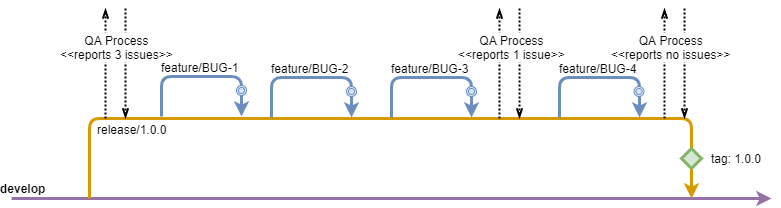
Once the release is started, testing should be immediately started.
In the unfortunate case where QA detects an issue, developers will need to provide fixes.
For this, a feature branch should be branched from the release branch for each reported issue.
Similar to normal development, this allows for multiple developers to work independent of each other on the fixes.
As a result, all reported issues are resolved more efficiently, productivity is increased and release time can be considerably shortened.
At the end of the release process, once QA confirms that there are no more issues detected, a tag is created to denote the corresponding version and the release branch is merged into develop and deleted.
The release is merged into develop to make sure that all the changes on the release branch are also included on develop, and, inherently, in the next release.
Similar to the feature branches, release branches are short-lived and exist only during the release process itself.
Once the tag has been created and the branch is deleted, the release is finalized with no further changes allowed.
Any additional changes to the release will be done through hotfixes.
There can always only be, at any given time, one release branch relative to develop and each long term stability 'lts/' branch.
This means you can have multiple release branches, but they cannot have the same source branch (develop or 'lts/').
When a release is finished, either the major or minor versions can be increased.
How to open a release
git fetch
git checkout -b <RELEASE> <SOURCE>
git push origin <RELEASE>
------------
<RELEASE> -	release branch that will be created
	        (release/x.y.z)
<SOURCE>  -	source branch for the release
	        (origin/develop, origin/lts/x,
	        origin/lts/x.y)
How to close a release
# get latest version of the release
git fetch
git checkout <RELEASE>
git pull
# create version tag and push it to remote
git tag <VERSION>
git push origin <VERSION>
# create maintenance tag and push it to remote
git tag --force <MAINTENANCE>
git push origin <MAINTENANCE>
# merge release branch into develop/lts branch
git checkout <TARGET>
git pull
git merge <RELEASE>
git push origin <TARGET>
------------
<RELEASE>     -	release branch that will be closed
	            (release/x.y.z)
<VERSION>     -	version of the release, also included in
	            the release branch name (x.y.z)
<MAINTENANCE> - partial version of the release (x.y)
<TARGET>      -	target branch for the release (develop,
	            lts/x, lts/x.y)